Ethernet
None of the protocols covered so far are built to move a lot of data quickly, they're built for small, frequent messages like "set this voltage" or "here's the current position." When the robot needs to move something bigger, a camera image, a firmware update, a stream of NetworkTables data, it uses Ethernet, the same wired networking technology used in offices and home networks.
Wiring: Twisted Pairs and Noise Resistance
Physically, Ethernet runs over a cable containing several twisted pairs of wires, terminated with an RJ45 (also called 8P8C) connector, the same familiar clear plastic plug used almost everywhere wired networking shows up.

Source: Wikimedia Commons
Each pair carries its signal the same way CAN does: as the difference between two wires carrying identical, inverted signals, rather than as one wire's voltage relative to ground. Twisting the two wires of a pair around each other keeps them exposed to almost exactly the same outside electrical noise, so that noise lands on both wires equally and cancels out when a receiver looks at the difference between them, exactly the same noise-rejection trick, applied to a completely different protocol.
The Ethernet Frame
Like a CAN frame, an Ethernet frame packages data into clearly defined fields rather than a raw stream of bits: a preamble and start frame delimiter first give receiving hardware time to synchronize, followed by the destination and source MAC addresses (a fixed hardware address that uniquely identifies each device), an EtherType field describing what kind of data the frame is carrying, the payload itself, and finally a frame check sequence, a checksum the receiver uses to detect a corrupted frame, the same job CAN's CRC field does.

Source: Wikimedia Commons
How Big Is 1,500 Bytes, Really?
A 1,500-byte payload doesn't mean much on its own without something to compare it to. A single NetworkTables entry, a boolean, a number, or a short string, is only a handful of bytes once its key name and type tag are included, so dozens of them could ride inside one frame with plenty of room left over. A compressed image from a vision camera is a different story: even fairly aggressively compressed, a single video frame commonly runs from tens of thousands of bytes up into the hundreds of thousands, meaning one camera frame alone has to be split across dozens, sometimes over a hundred, separate Ethernet frames before it can be reassembled on the receiving end. Push that further, a full firmware update or robot code deployment can run into the megabytes, which means thousands of individual 1,500-byte frames, each one built, sent, and acknowledged just to move that one file across the wire.
That's the practical reason the payload above is capped at 1,500 bytes in the first place: anything bigger than a single frame simply gets broken into as many frames as it takes, then stitched back together once every piece arrives, a job handled by the network stack's higher-level protocols, not by Ethernet itself.
Switching: Packets Go Only Where They're Addressed
Unlike PWM, UART, SPI, or I2C, Ethernet doesn't send raw signals continuously, it breaks data into discrete packets, each labeled with where it's headed, and a network switch reads those labels (the MAC addresses from the frame above) to deliver each packet only to the device it's actually addressed to, rather than broadcasting everything to everyone.
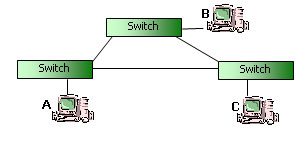
Source: Wikimedia Commons
Speed
The roboRIO's Ethernet port supports both 10 Mbit/s and 100 Mbit/s operation (10BASE-T and 100BASE-TX), and automatically negotiates with whatever it's plugged into, a radio, a switch, a coprocessor, to pick the faster of the two speeds both ends support. That's already an entire order of magnitude beyond CAN's 1 Mbit/s, which is exactly why Ethernet, not CAN, is what carries camera images and NetworkTables traffic on the robot.
Everything above is just the wiring, though, how robot code actually uses that wiring to share live data with dashboards and coprocessors is its own topic, covered in NetworkTables.
See Comparing the Protocols for how all six protocols in this section stack up against each other.