🧭 Coordinate Frames
"Where is the robot?" isn't a complete question until it's answered relative to something. A position by itself,
(3.2, 5.1), means nothing without knowing what point is (0, 0), which direction is positive x, and which
direction is positive y. That agreed-upon reference is a coordinate frame, and almost everything in vision and
localization, odometry, target detection, pose estimation, is really just different pieces of software agreeing on
which frame a number belongs to, and converting between frames when they don't.
WPILib's Convention: NWU
WPILib fixes this ambiguity by picking one convention everywhere: NWU, meaning +x points North (forward),
+y points West (left), and +z points Up. On a flat field, only the x/y plane matters, so in practice this
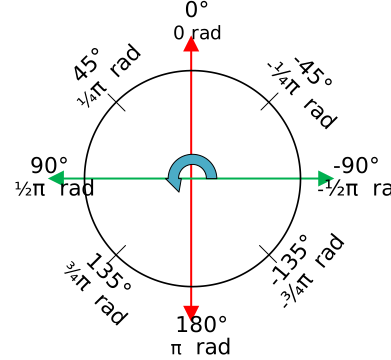
means: +x is "forward," +y is "left," and rotation is measured counterclockwise from the +x axis, exactly the
way angles work in standard math and trigonometry (0° along +x, 90° along +y), rather than the clockwise-from-
North convention a compass uses:
Source: WPILib Docs
Every WPILib geometry class, Translation2d, Rotation2d, Pose2d, follows this convention without exception, and
the mechanics of those classes themselves are covered in Geometry
Concepts. This document is about which frame those classes' numbers are
measured in, not the classes themselves.
Joysticks and game controllers report their axes in a different convention, NED (North-East-Down): pushing a joystick forward typically reports a negative Y value, not positive. That's a real, common source of an inverted- drive bug, not a bug in WPILib, joystick input has to be explicitly flipped to match the robot's NWU convention before it's used as a drive command.
The Field Frame
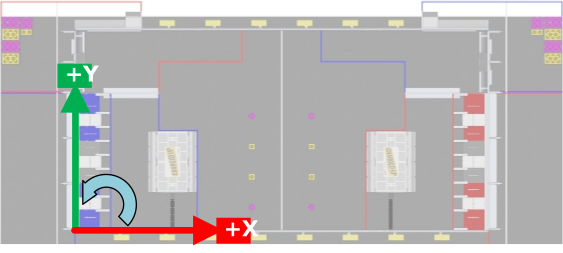
The field frame is fixed: it doesn't move no matter what the robot does, and every device on the field, robot
code, a dashboard, a vision coprocessor, agrees on where its origin and axes are. WPILib's standard placement puts
the origin at the corner of the field to the right of the blue alliance's driver stations, with +x pointing away
from the blue alliance wall (downfield, toward red) and +y pointing left from that same vantage point:
Source: WPILib Docs
Tools across the FRC ecosystem, PathPlanner, Choreo, AdvantageScope, and the field's published AprilTag layout, all
report positions in this same fixed frame, which is what makes a pose computed by one piece of software directly
usable by another without translation. A robot's overall goal, in almost every sense that matters for localization,
is to know its own Pose2d (an (x, y, θ) triple) in the field frame at all times.
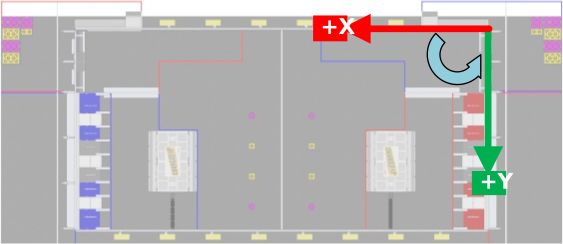
Because the field frame is always anchored to the blue alliance wall, a robot on the red alliance has to explicitly account for that when driving field-relative, mirroring or rotating commands, rather than the origin moving to match whichever alliance the robot is on:
Source: WPILib Docs
The Robot Frame
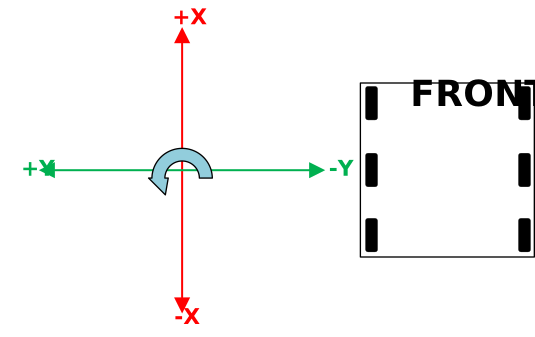
The robot frame moves and rotates with the robot, its origin is typically the robot's center, +x points out
the front of the chassis, and +y points out its left side:
Source: WPILib Docs
Anything measured "relative to the robot," a bumper's corner, a camera's mounting position, an arm's pivot point, is naturally expressed in this frame because those distances stay constant no matter where the robot is on the field or which way it's facing.
The entire localization problem, at its core, is relating these first two frames to each other: given the robot's pose in the field frame, everything mounted on the robot can be located on the field too, just by knowing its fixed offset from the robot frame's origin.
Camera and Target Frames
Two more frames come up constantly once vision enters the picture. A camera frame is centered on the camera's
lens, with +x pointing straight out of the lens (whatever the camera is looking at), fixed relative to the robot
frame by however the camera happens to be mounted. A target frame is centered on whatever the camera is looking
at, an AprilTag's frame, for instance, is centered on the tag with +x pointing straight out of its face, and it's
fixed relative to the field frame, because the field's AprilTags don't move once the field is built.
Composing Frames: Poses and Transforms
Two closely related types show up any time frames need to be related to each other, and the distinction between
them matters. A pose (Pose2d) is an absolute position and heading within one specific frame, "the robot is
here, facing this way, in the field frame." A transform (Transform2d) is a relative offset between two poses,
"the camera sits this far forward and this far left of the robot's center, rotated this many degrees," and it says
nothing about any absolute location on its own.
The reason to separate them is that they compose predictably: a pose plus a transform yields another pose in the
same frame the first pose was in (fieldToRobot plus robotToCamera yields fieldToCamera, the camera's absolute
field pose), and subtracting one pose from another yields the transform between them. That single rule, chaining
poses and transforms together, is exactly the mechanism Pose Estimation later uses to turn
"here's a tag relative to the camera" into "here's the robot on the field."
With a shared frame established, the next question is how the robot figures out where it actually is inside it without any outside help at all, which is where Odometry starts.